

Your financial preferences set the currency for your amounts, your fiscal year-end date and your standard hourly rate. These settings directly affect your reports and dashboard widgets. Here’s how to set them.
What you’ll need
- An InnoBooks account with permission to access financial settings (an
Adminrole or equivalent). - Your fiscal year-end date (month and day).
- Your standard hourly rate, if you bill by time.
Steps
- Open the Tax and Financial Information page
From the menu, open the
Settingspage, then click theTax and Financial Informationcard (“Add or edit financial preference for about your business”).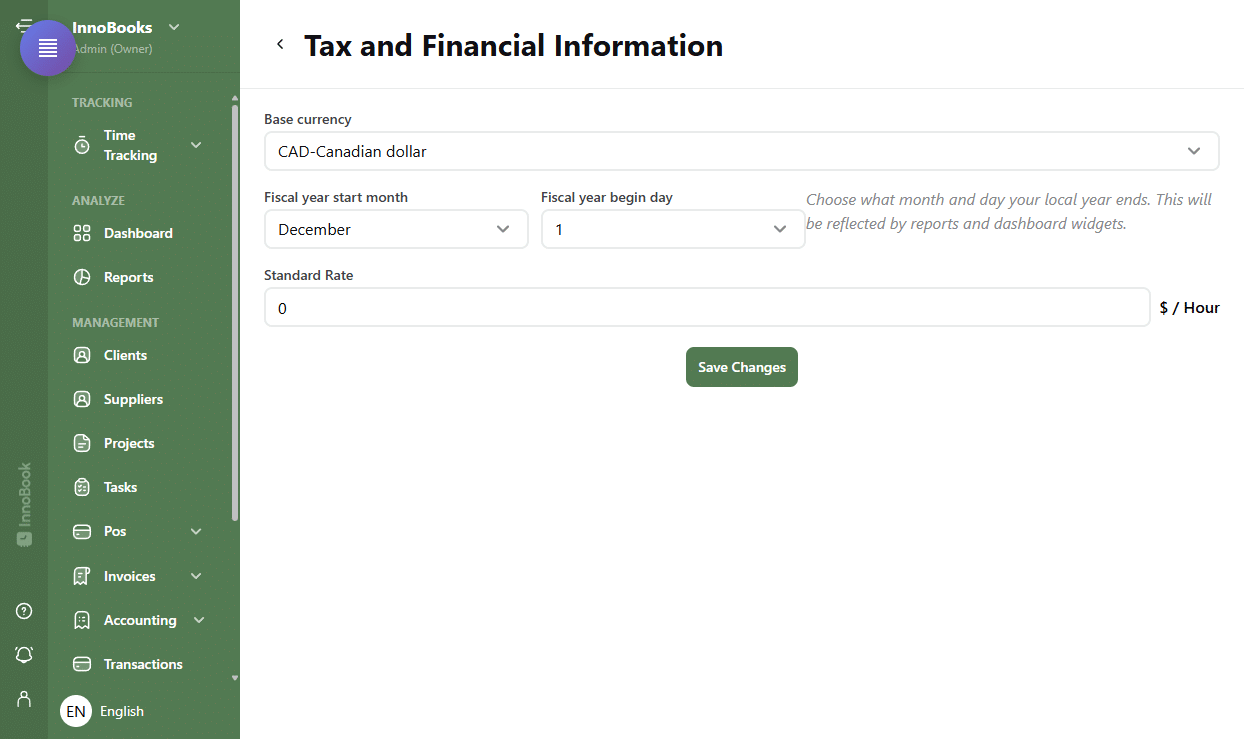
The Settings page with the Tax and Financial Information card highlighted. - Choose the base currency
In the
Base currencyfield, clickSelect a currencyand pick your currency. For a Quebec business, choose the Canadian dollar (CAD). - Set the fiscal year start
Set the
Fiscal year start monthand theFiscal year begin day. InnoBooks notes: “Choose what month and day your local year ends. This will be reflected by reports and dashboard widgets.” - Set the standard rate
In the
Standard Ratefield, enter your hourly rate (unit shown:$ / Hour). This rate acts as the default for time-based billing. - Save changes
Click
Save Changesat the bottom of the page. Your preferences are saved and applied to your reports.

Tips & edge cases
- This page does not manage sales taxes. Quebec’s GST (5%) and QST (9.975%) are set up in the
Tax Managementpage in settings. - The fiscal year start determines the period covered by your annual reports and dashboard widgets: make sure it matches your tax filing.
- The
Standard Rateis optional: leave it blank if you don’t bill by time.
Frequently asked questions
How do I change my account currency?
Open Settings then the Tax and Financial Information card, click the Base currency field (Select a currency) and pick the currency you want, then click Save Changes.
How do I set my fiscal year?
Set the Fiscal year start month and the Fiscal year begin day. These values determine the year-end reflected in reports and dashboard widgets.
Do I set up GST and QST here?
No. The Tax and Financial Information page covers currency, fiscal year and standard rate. Sales taxes (GST 5% and QST 9.975%) are managed in the Tax Management page in settings.