

The
User Report(Revenu Québec’s operator report, specification SW-73) summarizes, for a given year, the operator identity, the last document produced and the sales and tax summary. This guide shows how to view it, change the year, download it as a compliant PDF or print it. The exact content of the report is defined by Revenu Québec — see revenuquebec.ca.
What you’ll need
- The POS add-on active on your company (the MEV-WEB module depends on it).
- Receipt read permission (
receipts.read) — this is what grants access to the report. - MEV-WEB in service, with sales already recorded and transmitted.
Steps
- Open the User Report
Open the
User Reportpage. InnoBooks automatically loads the current year’s data. Access requires thereceipts.readpermission.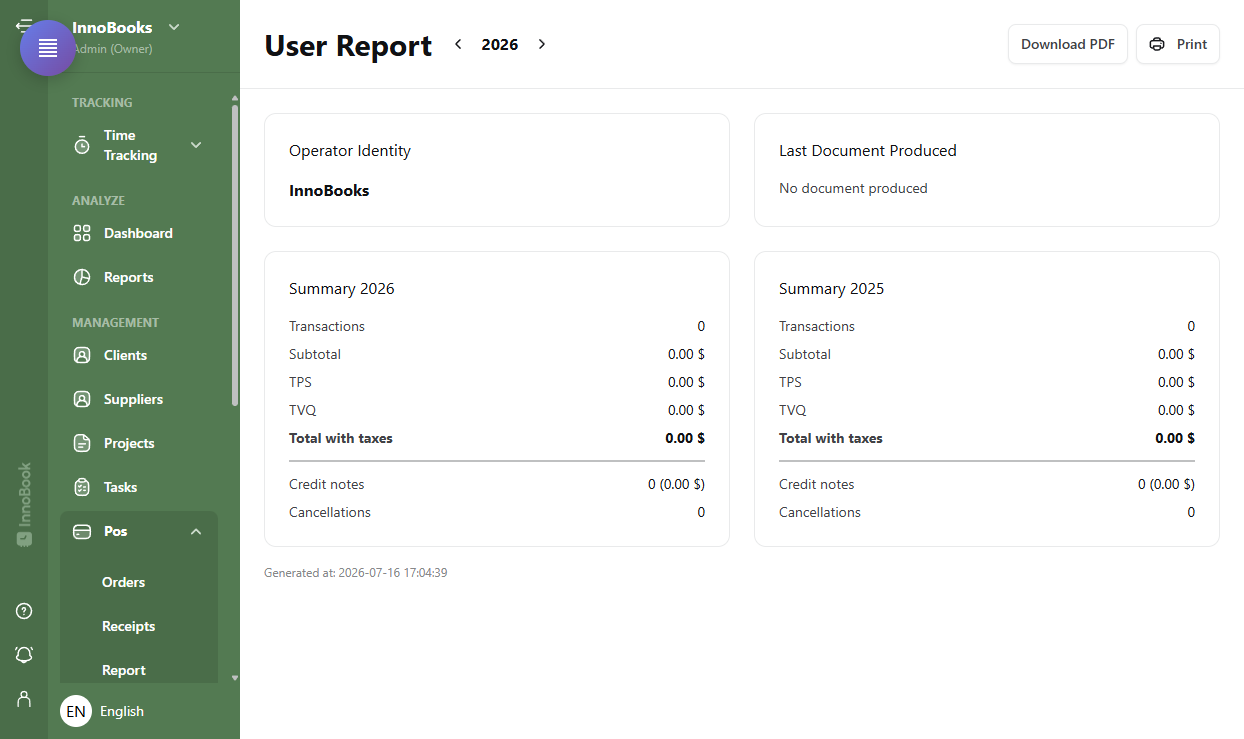
The User Report header with the year selector and the download buttons. - Choose the year
Use the arrows on either side of the year, in the header, to go back or forward one year. The report reloads for the chosen year.
- Check the identity and the last document
The
Operator Identitycard shows the business name, address, NEQ, your tax numbers and the SEV identifier. TheLast Document Producedcard shows theNumber,TypeandDateof the latest receipt — orNo document producedif there is none. - Read the sales and tax summary
Two
Summarycards present the current year and the previous year: number ofTransactions,Subtotal, the TPS/GST and TVQ/QST amounts collected,Total with taxes, plusCredit notesandCancellations. At the bottom,Generated attimestamps the report. - Download the PDF or print
Click
Download PDFto get the compliant PDF document (the operator report) with a signed QR code, orPrintto send it to the printer. Keep this document with your records.

Tips & edge cases
- Two years side by side: the report always compares the selected year with the previous one, handy for a quick look at how sales are evolving.
- Compliant document: the downloaded PDF is the operator report with a signed QR code — that’s the version to keep, not a mere screenshot.
- Separate permission: access depends on
receipts.read, which differs from the MEV-WEB settings permission. An employee can therefore view the report without reaching the configuration. - Printing: the
Printbutton sends the report to the configured printer; a message confirms it was sent. - No document: if no sale was produced for the period, the card shows
No document produced.
Frequently asked questions
What is the user report for?
It’s the operator report required by Revenu Québec (specification SW-73). It summarizes the operator identity, the last document produced and the sales and tax summary. Its exact content and requirements are set by Revenu Québec — see revenuquebec.ca.
What permission do I need to open it?
Receipt read permission (receipts.read). It differs from the MEV-WEB settings permission, so you can grant access to the report without opening the configuration.
Is the PDF an official document?
The download produces the compliant PDF of the operator report with a signed QR code. Keep it with your records; refer to Revenu Québec for retention rules.