

The cash count lets you count bills and coins at the end of the day, then compare the real amount to what InnoBooks expects. The variance is shown at a glance, and you can post it to your books in one click. Here’s how.
What you’ll need
- The POS add-on enabled on your business.
- Permission to access the cash count.
- Your cash drawer on hand to count bills and coins.
Steps
- Open the cash count
From
Transactions, open theCash Countpage. Four cards summarize the situation:Expected in drawer,Last count,Cash received sinceandMovements since. ClickNew Count.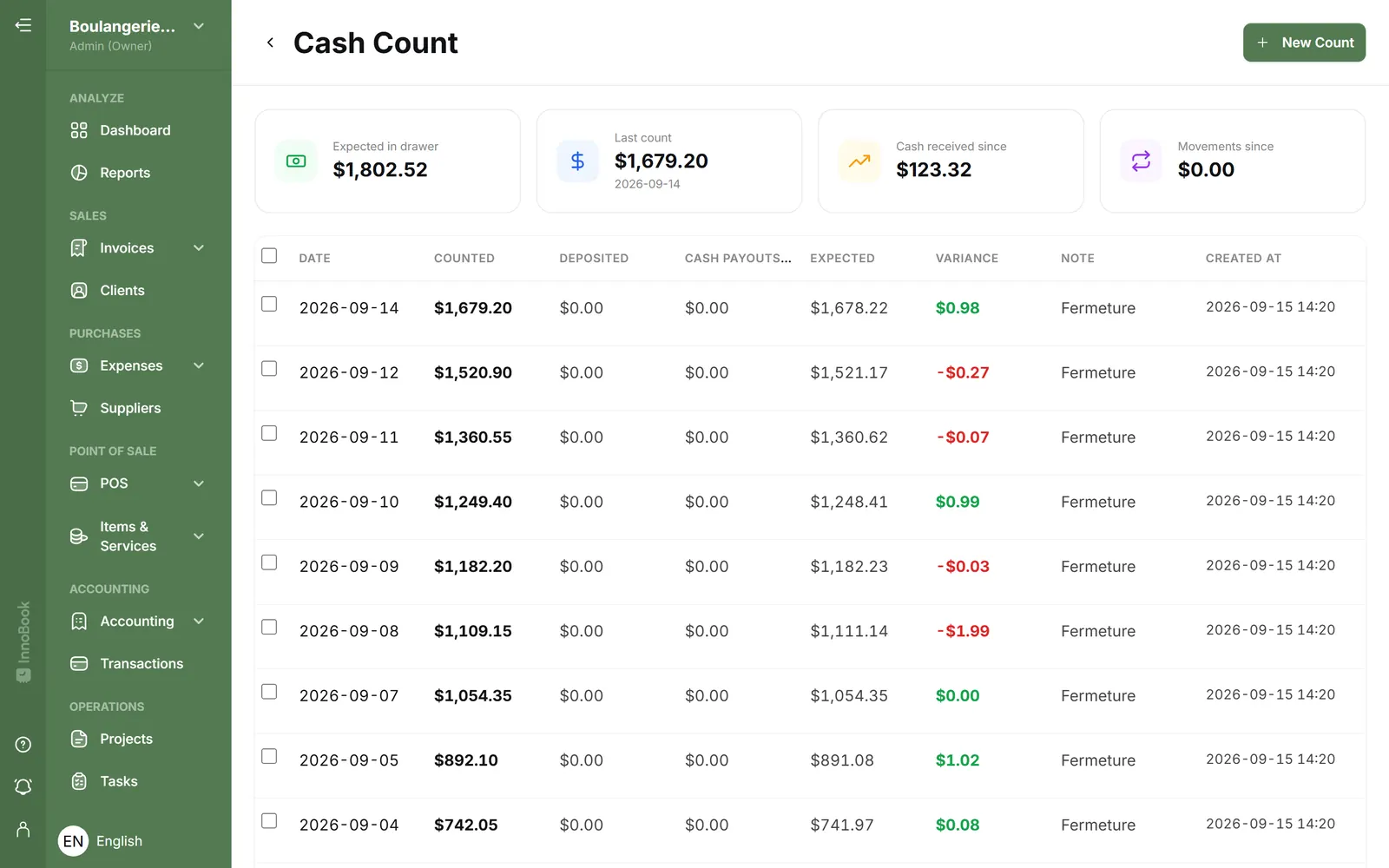
The Cash Count page with its summary cards and the New Count button. - Enter the bills and coins
In the window, enter the quantity of each denomination. The
Billssection covers $100, $50, $20, $10 and $5; theCoinssection covers $2, $1, $0.25, $0.10 and $0.05. Each line’s amount is calculated automatically, with aSubtotal Bills, aSubtotal Coinsand aGrand Total. - Add a note and save
Add a
Noteif needed, then clickSave Count. TheClear Allbutton resets the quantities to zero. Saving stays disabled while the total is zero. The count then appears in the list with itsDate, theCountedamount, theExpectedand theVariance. - Review the expected and the variance
Open a count to see its calculation:
Opening balance,Cash received,Movements(transfers and adjustments),Expected, then theVariancebetween the counted amount and the expected. A positive variance shows in green, a negative one in red. - Post the adjustment and record cash payouts (Optional)
If the variance isn’t zero, click
Post adjustment: InnoBooks posts the entry to GL 6900 “Cash Short/Over”. InCash payouts, record cash taken out of the drawer to pay an expense (amount + reason) — this reduces the variance. You can delete a count from the list by selecting it.

Tips & edge cases
- The
Expectedamount is computed as: opening balance + cash received + movements.Cash payoutsare not subtracted from the expected: they instead go into the variance, added to the counted amount. - A green
Varianceflags a surplus, a red one a shortage. Aim for zero: recount before posting an adjustment. Post adjustmentwrites the variance to your books (GL 6900); once posted, it can’t be posted again for that count.Cash payouts(cash taken from the drawer for an expense) reduce the variance: record them to keep an accurate count.- The
Expected in drawercard at the top of the page always shows what should be in the drawer right now.
Frequently asked questions
How is the expected amount calculated?
InnoBooks starts from the Opening balance, adds Cash received and Movements (transfers, adjustments). The result is the Expected amount in the drawer. Cash payouts are not removed from the expected; they go into the variance, added to the counted amount.
What does the variance mean?
The Variance is the difference between the amount you actually counted and the expected amount. Positive (green) = surplus; negative (red) = shortage.
What does “Post adjustment” do?
It posts the variance to your books, to GL 6900 “Cash Short/Over”: a surplus is recorded there, a shortage is booked as an expense. It’s available when the variance isn’t zero and no adjustment has been posted yet.
What is a cash payout?
It’s cash taken out of the drawer to pay an expense. Record the amount and reason in the Cash payouts section; the total reduces your count’s variance.