
In InnoBooks, a project brings together a client, a team and a rate (hourly or flat). Once the project is created, you log time and services against it, then track its profitability right from the list: logged time, unbilled amount and total amount. Here’s the full walkthrough.
What you’ll need #
- A client already saved in InnoBooks (you’ll assign it to the project).
- Permission to create projects.
- Team members already invited, if you want to add them to the project.
Steps #
- Open the Projects page
From the menu, open the
Projectspage, then clickCreate New Projectat the top right. The add-project form opens.
The Projects page with the Create New Project button highlighted. - Choose the type and name the project
Select the
Project Type, then fill in theProject Nameand, if needed, aDescription. - Assign the client and end date
In
Assign Client, select the project’s client. Then pick the expectedEnd Date. - Set the rate and budget
If the type is hourly, enter the
Hourly Rate. You can also set aFlat Rateand aTotal Hoursas a budget. TickBillableif the project’s work should be re-invoiced to the client. - Add members and services
Under
Member, click the “+” button to add team members to the project. ClickAdd a Serviceto list the billed services: each row showsService Name,Rate,Quantity,TaxandLine Total(apply GST 5% and QST 9.975% as needed). - Save and track profitability
Click
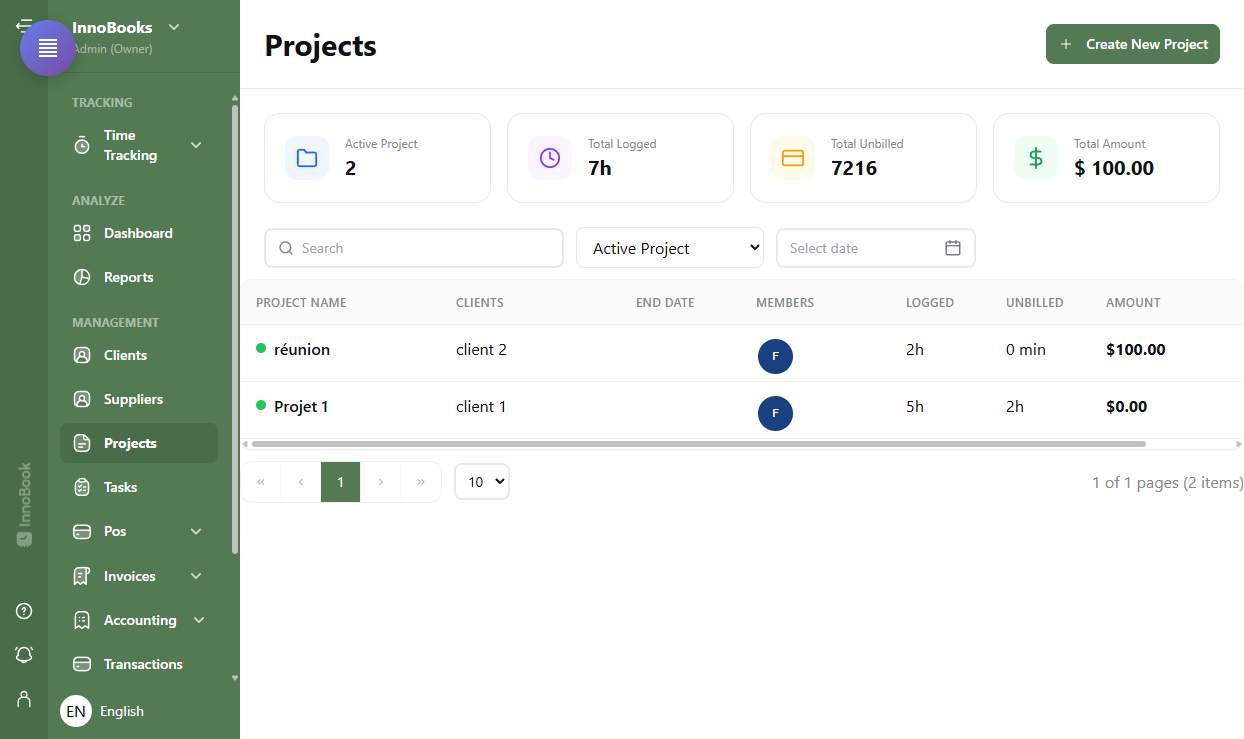
Saveto create the project. It appears in the list with theLogged,UnbilledandAmountcolumns. The cards at the top summarizeTotal Logged,Total UnbilledandTotal Amountacross all your projects.
Tips & edge cases #
- Time logged against this project through
Time Trackingis automatically added up in theLoggedcolumn. - Filter the list with the status selector (
All Status,Active Project,UnActive Project,Archive Project), the search box and the date filter. - A finished project can be
Archivedrather thanDeletedfrom the three-dot menu; an inactive or archived project can beActivatedagain. - The pencil button reopens the form to
Edit a Project(rate, members, services…).
Frequently asked questions #
How do I set a rate or an hours budget? #
In the form, choose the Project Type: an hourly type reveals the Hourly Rate field. You can also enter a Flat Rate and a Total Hours as a reference budget.
How do I track a project’s profitability? #
From the Projects list: the Logged, Unbilled and Amount columns show the time logged and the amounts per project, and the cards at the top give the Total Logged, Total Unbilled and Total Amount totals.
How do I archive a finished project? #
In the list, open the three-dot menu on the project’s row and choose Archive. The project stays available through the Archive Project filter and can be Activated later.


